How to Log in to an Account B9 Game
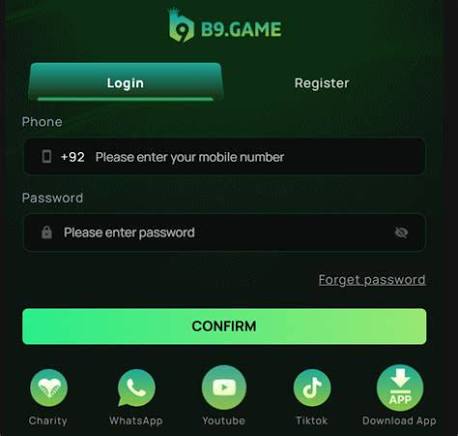
The B9 Game Login process allows existing users to access their account without creating a new profile. If you already have a registered account, you normally need your registered Pakistani mobile number and account password to sign in.
The current B9 Game login page shows a mobile-number field using the +92 format, a password field, a Confirm button, a Forget Password option, and a registration link for new users. A Google login option is also displayed on the current page.
This guide explains how to sign in, recover a forgotten password, troubleshoot common problems, and keep your account secure.
What Is B9 Game Login?
Login is the process of accessing an existing B9 Game account.
Registration and login are different. Registration creates a new account, while login is used by someone who already has account credentials.
After successful access, the current B9 Game dashboard can provide account-related features such as games, wallet functions, promotions, profile settings, deposits, withdrawals, and account history.
What Do You Need to Sign In?
Before opening the login page, make sure you have:
| Login Requirement | Details |
|---|---|
| Registered mobile number | Number connected to your account |
| Country format | +92 for the current Pakistan login |
| Password | Your existing account password |
| Internet | Required for online account access |
| Supported device | Phone, browser, or supported environment |
If you recently changed phones, you generally do not need to create another account simply because you are using a different device. Use the credentials associated with your existing profile.
How to Complete B9 Game Login
Step 1: Open B9 Game
Open the B9 Game application or current login page.
If you see the registration screen, select Login because you already have an account.
Step 2: Enter Your Mobile Number
The current login page uses a Pakistani mobile number beginning with +92.
Check the number carefully before continuing.
A common mistake is entering +92 twice when the country code is already displayed by the form.
Step 3: Enter Your Password
Enter the password connected to your account.
Remember that passwords can be case-sensitive. An uppercase letter and lowercase letter are not always treated as the same character.
If your phone automatically fills an old password, remove it and enter your current password manually.
Step 4: Tap Confirm
After checking the information, press CONFIRM.
If the credentials are correct, the account should open and take you to the available dashboard features.
Common B9 Login Problems
Login errors can happen for several reasons.
Wrong Mobile Number
Make sure you are entering the same number used when the account was registered.
Check for:
- Missing digits
- Extra digits
- Duplicate +92
- Incorrect SIM number
- Extra spaces
If you registered with one number and are entering another, the system may not recognize the account.
Forgotten Password
If you cannot remember your password, avoid repeatedly guessing.
Select Forget Password? from the login page and use the available recovery process. The current recovery system provides phone and email options.
Saved Password Is Incorrect
Browsers and phones can automatically fill previously saved passwords.
If your login keeps failing despite having the correct number, delete the automatically inserted password and type the current one yourself.
How to Recover a Forgotten Password
The current B9 Game Login page provides a Forget Password? option.
Phone Recovery
The phone recovery method uses the registered mobile number and verification information.
Enter the required number and follow the verification instructions. If an OTP is sent to your registered phone, enter the current code when requested.
Email Recovery
The current recovery interface also provides an email route.
The email recovery process can require the registered phone number, registered email address, and the verification information displayed by the system. An OTP can then be sent to the registered email.
Once verification is completed, create a new password and return to the normal login screen.
What If the OTP Does Not Arrive?
If you are trying to recover your account and the verification code does not arrive, first check whether you entered the correct phone number or email address.
Then:
- Check your network connection.
- Confirm that the registered contact information is correct.
- Wait briefly for the message.
- Request a new code if the option is available.
- Use the newest OTP when multiple codes arrive.
Never send your OTP to another person.
Login on a New Phone
Changing your physical device does not necessarily mean you need a new account.
Install or open the supported B9 application on the new device and use the existing account credentials.
The important difference is between changing a phone and changing the registered mobile number.
If you still have the original account credentials, logging in on another supported device is generally straightforward.
If you have lost access to the registered number, account recovery can become more difficult because verification may depend on that number.
B9 Login Security Tips
Your account password should remain private.
Avoid entering account information on suspicious websites or links received through unknown messages.
Use these simple security practices:
- Keep your password private.
- Never share OTP codes.
- Do not use modified APK files.
- Check the website address before signing in.
- Avoid saving passwords on shared computers.
- Log out from devices that other people can access.
- Keep your phone’s operating system updated.
- Review account activity when something looks unusual.
If someone asks for your password or OTP while claiming to be support, verify the request through an official support channel first.
Login vs Registration
It is easy for new users to confuse these two options.
| Option | Purpose |
|---|---|
| Register | Creates a new account |
| Login | Opens an existing account |
| Forget Password | Recovers access to an existing account |
If you already have an account, creating another profile is not a replacement for password recovery.
What If Login Keeps Loading?
A login page that does not complete can sometimes be caused by an unstable internet connection or an outdated session.
Try these steps:
- Check your Wi-Fi or mobile data.
- Close and reopen the app.
- Enter your mobile number manually.
- Type the current password manually.
- Refresh the browser if using web access.
- Check whether the service is temporarily unavailable.
- Try again after the connection becomes stable.
Avoid repeatedly submitting the same form while it is still loading.
B9 Game Login FAQs
What number is required for login?
The current login page asks for the registered Pakistani mobile number using the +92 format.
What if I forget my password?
Select Forget Password? and follow the available phone or email recovery process.
Can I use the same account on another phone?
If the device is supported, you can use your existing account credentials rather than registering again.
Why does my password not work?
Check capitalization, saved-password autofill, and whether you are using the current password. If necessary, use password recovery.
Why am I receiving an incorrect OTP message?
Make sure you are entering the newest verification code associated with the current recovery request. Older codes may no longer work after a new one is generated.
Can I login with Google?
The current login screen displays a Google login option. Whether it works for a particular account depends on how that account is connected.
What should I do if my registered SIM is lost?
Try the available email recovery method if your email is linked to the account. If you cannot verify ownership through the available recovery methods, contact the service’s official support.
Final Thoughts
The B9 Game Login process is simple when you have the correct registered mobile number and password. The current login screen uses a Pakistani +92 mobile number, password, and Confirm button, while password recovery is available for users who cannot remember their credentials.
For account security, keep your password and verification codes private and avoid unofficial links or modified applications. If login fails, check the mobile number, password, connection, and recovery options before creating another account.