How To Register an Account B9 Game
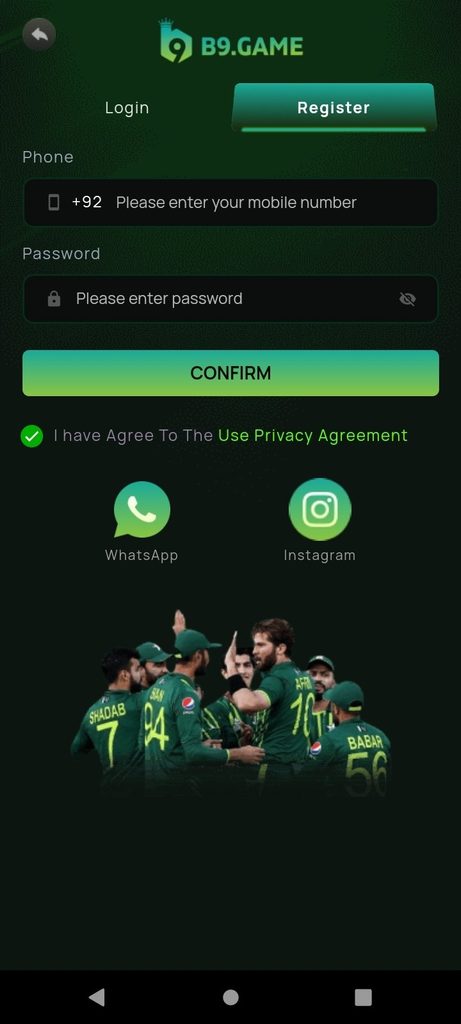
If you are looking for a simple way to complete B9 Game Register, this guide explains the signup process step by step. Creating an account is the first step for users who want to access the platform, manage their profile, and use account-related features.
The current B9 Game registration page asks users for a Pakistani mobile number beginning with +92, a password, and acceptance of the displayed privacy agreement. The service also states that registration is free and that users should meet its age requirement of 18 or older.
What Is B9 Game Registration?
Registration means creating a new account that can later be used for login and account management. After successful signup, users can access the available gaming sections, wallet features, promotions, profile settings, and other account functions.
The mobile number is particularly important because it can be connected with verification and account recovery. For this reason, users should enter a number that belongs to them and that they can access when verification is required.
What You Need Before Creating an Account
Before starting the signup process, keep the following things ready:
| Requirement | Purpose |
|---|---|
| Pakistani mobile number | Account registration and verification |
| Secure password | Future account login |
| Active SIM | Receiving verification messages |
| Internet connection | Opening and completing signup |
| Compatible device | Accessing the platform |
| Privacy agreement | Completing registration |
Using accurate information can make future account recovery easier.
How to Register on B9 Game
The registration process is straightforward.
Step 1: Open the Registration Page
Open the B9 Game application or the current official website and select Register rather than Login.
New users should use the registration option because Login is intended for an account that has already been created.
Step 2: Enter Your Mobile Number
The current signup screen uses a Pakistani mobile number with the +92 country code. Enter your number in the format requested by the registration form.
Make sure you do not accidentally enter the country code twice.
For example, if +92 is already displayed, do not add another +92 inside the number field.
Step 3: Create a Password
Choose a strong password that you can remember but other people cannot easily guess.
Avoid simple passwords based on your name, birthday, mobile number, or common words. Never share your account password with another person.
Step 4: Accept the Agreement
Read the privacy or account agreement shown on the registration screen. If you agree with the applicable terms, select the required checkbox.
Step 5: Confirm Registration
After checking your information, tap CONFIRM.
Depending on the current verification process, you may be asked to complete an additional verification step before the account becomes accessible.
B9 Game Registration and Mobile Verification
Mobile verification can be an important part of account creation. The registered number may also be useful if you later need to recover your password.
If a verification code is requested, wait for the message and enter the current code in the appropriate field.
Do not share an OTP with anyone claiming to be customer support. Verification codes should remain private.
If the code does not arrive, check your mobile signal, confirm that the number was entered correctly, and wait before requesting another code.
Common Registration Problems
Sometimes signup may not work on the first attempt. Here are some common issues:
Mobile Number Already Registered
If the system says the number already exists, do not create another account immediately. The number may already be connected to an existing profile.
Instead, use the Login option. If you have forgotten your password, use the available recovery option.
Incorrect Mobile Number
If you enter the wrong number, verification messages may not reach you.
Always double-check the number before confirming registration.
OTP Not Received
A delayed SMS can happen because of network conditions or other temporary issues.
Check your signal, make sure the SIM is active, and request a new code only when the page provides that option.
Weak Password
If the registration form rejects your password, follow the requirements shown on the current page. A stronger password containing different character types is generally preferable.
What Happens After Registration?
After successful signup, your new account can be used to access the available B9 Game features.
The current B9 Game service describes account functions including games, wallet activity, promotions, profile settings, deposits, withdrawals, and account history.
Before using any money-related feature, read the current rules, limits, and conditions displayed by the service.
B9 Game Register Safety Tips
Account security should be taken seriously from the beginning.
Follow these basic practices:
- Use your own mobile number.
- Create a unique password.
- Never share your password.
- Never share OTP or verification codes.
- Avoid unofficial APK files.
- Check the website address before entering account information.
- Keep your phone protected with a screen lock.
- Review payment information carefully.
- Read current promotion conditions before participating.
These steps can help reduce avoidable account-access and security problems.
Frequently Asked Questions
Is B9 Game registration free?
The current registration page states that creating an account is free.
What number is required for registration?
The current signup screen asks for a Pakistani mobile number using the +92 format.
Can I register with a number that already has an account?
If the number is already connected to an existing account, use Login or password recovery instead of creating another account.
What if I forget my registration password?
Use the password recovery option available from the Login page. The current recovery system provides phone and email verification routes.
Is B9 Game suitable for everyone?
The current registration information identifies the service as 18+. Users should follow applicable laws and the service’s current terms.
Final Thoughts
Completing B9 Game Register is mainly about entering the correct Pakistani mobile number, creating a secure password, accepting the displayed agreement, and completing any required verification.
Using accurate account information from the beginning can make login and recovery easier later. Before making deposits or using real-money features, always review the latest rules and conditions because these can change over time.